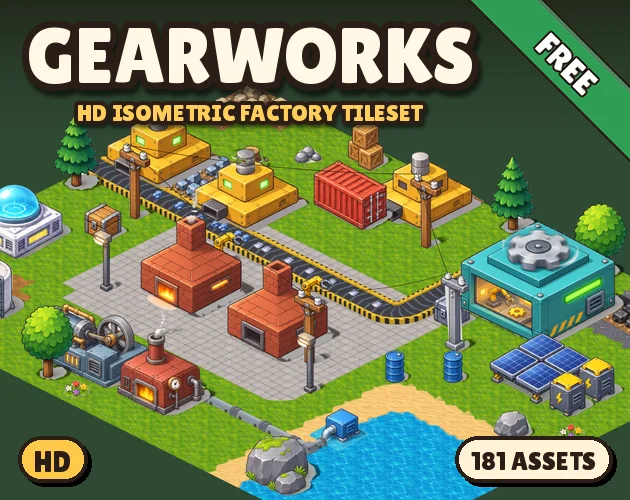
Gearworks – free HD isometric tileset
Machines with idle and running states, animated conveyor belts, inserters in 4 directions, pipes, power, ore, ground tiles, icons and FX.
| Genre | Factory automation |
|---|---|
| FREE pack | 184 assets |
| LITE pack | $7.99 · 454 assets + 22 VFX |
| Tile size | 128×64 and 256×128 (2:1 isometric) |
| Version | 1.1 |
| License | Commercial use allowed, no credit required; no resale of the assets |
| Art | AI-assisted art, finished by hand (see license) |
What's in Gearworks
Cheerful HD cartoon assets for an isometric factory / automation game, on an exact 2:1 grid. Machines come in idle and running states that swap in place, conveyor belts are animated (8 frames) and pick their turns automatically, pipes autotile, and the ground has every corner-terrain transition. With this FREE pack alone you can build a complete small factory: ore fields with drills, a belt line through furnaces to an assembler, a steam power plant by a lake, poles, storage and a yard (see tiled/example_256.tmx and the demo).
Version 1.1 (2026-11-20): adds 3 demo VFX (vfx/). 1.0 was the first release.
What's inside
| Folder | Content |
|---|---|
sprites/machines/ | 14 sprites: mining drill 2×2 (idle, running), stone furnace 2×2 (cold, lit), assembling machine 3×3 (idle, running: lit window with a robot arm inside), boiler 2×2, steam engine 3×2, plus mirrored facings of drill, furnace, boiler and steam engine |
sprites/logistics/ | 8 sprites: inserter in 4 directions, offshore pump (2 facings), pipe-to-ground (2 facings) |
sprites/power/ | 6 sprites: wooden pole, steel pole, solar panel array 2×2, accumulator, street lamp, research lab 2×2 |
sprites/storage/ | 7 sprites: wooden chest, iron chest, storage tank 2×2, shipping container (2×1 and 1×2), crate stack, oil barrel |
sprites/nature/ | 8 sprites: leafy tree, pine, bush, boulder, small rocks, big mossy rock 2×2, wildflowers, stump |
sprites/ore/ | 4 ground overlays: iron, copper, coal, stone patch |
belts/ | Conveyor belt, 24 pieces × 8 frames: straight (E, S, W, N), 8 turns, 2-lane splitter (4 directions), underground entrance + exit (4 directions) |
pipes/ | Steel pipe, 16 autotile masks |
tiles/ | Ground: grass, dirt, concrete, sand, water, gravel + 70 transition tiles (corner terrain, every mask): grass/dirt, grass/sand, sand/water (with foam), grass/gravel, grass/concrete |
icons/ | 12 item icons (32, 64, 128 px): iron ore, copper ore, coal, stone, iron plate, copper plate, steel beam, gear, copper wire, circuit, brick, red science flask. The 32 px icons are the items that ride the belts |
fx/ | 6 flipbook strips: furnace smoke (loop), boiler steam (loop), drill dust (loop), spark burst, build dust, build sparkle |
vfx/ | New in 1.1: 3 VFX from the Gearworks VFX set: placement ring (loop), item craft pop, demolish puff. Strip + single frames, data/vfx.json (frames, fps, loop, anchor, blend). The full set of 22 is in LITE |
data/ | sprites.json, belts.json, pipes.json, tiles.json, icons.json, fx.json, vfx.json, example_map.json: sizes, anchors, footprints, states, directions, masks, Wang corners |
tiled/ | Tiled tilesets (ground with a Ground terrain set, objects, logistics with animated belt tiles) + the example factory map, for both tile sizes |
demo/ | HTML5 canvas demo: lay belts that turn automatically, items ride them, drills, furnaces and the assembler switch idle/running, pipes autotile, smoke and steam |
Every image comes at 128×64 and 256×128 tile size (HD master).
How the sprites line up
- Anchor = the south corner of the object's footprint, given per image in
data/*.json(sizes[N].anchor). It is always at x = width / 2 and y = height − below_px, wherebelow_pxis one number per file family and size (painted shadows reach a few px below the south corner). Put the anchor on the south corner of the footprint's last cell and the object sits exactly on the grid. The Tiled tilesets do this for you (objectalignment="bottom"+tileoffset= below_px). - States swap in place:
drill_idle↔drill_run,furnace_off↔furnace_on,assembler_idle↔assembler_runhave the same size and anchor. - Mirrored facings (
*_m,inserter_w,inserter_e) are the painted sprite flipped left-right. That swaps the x and y axes (a 3×2 engine becomes 2×3) and keeps the same anchor. The sunlight then comes from the top-right on these. - Ground tiles are exactly tile-sized diamonds: draw them with the top-left at (cell west x, cell north y).
- Depth sort: draw ground, ore patches, belts, the items on the belts, then objects and pipes sorted by
x + yof their footprint's south corner.
Belts
Directions: E = +x (screen down-right), S = +y (down-left), W = −x (up-left), N = −y (up-right). Pick the piece per cell from the belt's direction d:
- the cell behind (cell − d) is a belt going
d→straight_d; - else exactly one side neighbour feeds into this cell →
turn_<that side's direction><d>; - else
straight_d.
The treads move 1/32 tile per frame at 15 fps (8 frames = 1/4 tile). Items moving at 15/32 tiles per second stay in step with the belt. Draw them about 12 × tile/256 px above the ground.
Pipes
pipe_<mask> with bits 1 = N (−y), 2 = E (+x), 4 = S (+y), 8 = W (−x): set a bit when that neighbour is a pipe or a machine port.
Ground transitions
Store the terrain at the cell corners. Corner n/e/s/w of cell (x, y) is grid point (x, y), (x+1, y), (x+1, y+1), (x, y+1). Four equal corners → the base tile. Two materials that form a pair → at_<base>_<over>_<corners>, where <corners> lists the corners that are <over>. Keep sand between water and grass. In Tiled, use the Ground terrain set with the Terrain Brush.
VFX (new in 1.1)
vfx/@128 and vfx/@256: every effect is a horizontal strip (<name>.png, frames side by side) and the same frames one per file (frames/<name>_NN.png). data/vfx.json gives frame_size, frames, fps, loop (false = play once), anchor (the pixel of one frame that goes on the target point: furnace mouth, chimney top, tile centre...) and blend: add effects are meant for additive blending (canvas lighter, Godot CanvasItemMaterial blend mode Add, Unity Additive). Effects with a glow entry have an extra soft layer with the same frames and anchor; draw it additively under the effect. build_ring_ok / build_ring_bad cover one 1×1 tile; scale them by the footprint for bigger machines. In the demo, press VFX to see them all play, pick a machine with Place to see the placement ring, and Erase one for the demolish puff.
Running the demo
Browsers block local file loading, so serve the pack folder: python3 -m http.server in this folder, then open http://localhost:8000/demo/.
Licence
See LICENSE.txt. Use the assets in any number of your own projects, free or commercial. Do not resell or share the assets themselves.
AI disclosure: the machines, props, nature, ground textures and icons were made with the help of generative AI image tools and then cut, cleaned, aligned to the grid and given states and metadata by dotPLAYS. The conveyor belts, pipes, terrain transitions and FX are drawn entirely in code.
A LITE version (tier 2 machines, fast belts, rails, a second biome, more icons) is coming to the same page.
From the pack's README.md. Folder names refer to the files inside the download.
License
Read the full license
dotPLAYS Asset License
Copyright (c) 2026 dotPLAYS (https://dotplays.com)

When you buy or download this pack you may:
- Use the assets in any number of your own games, apps, videos, prototypes and other projects, free or commercial.
- Modify, recolour, crop, scale and combine the assets with other assets.
- Use the assets in projects you build for a client.
- Credit is welcome but not required.

You may not:
- Resell, share or give away the assets themselves, on their own or in another asset pack, template or collection,
  even if they are modified.
- Upload the assets as stock content or as NFTs.
- Use the assets as training data for machine-learning models.
- Use the assets, or modified versions of them, as a logo or trademark.

The demo code in demo/ may be used and changed freely in your own projects.

The assets are provided "as is", without warranty of any kind.

AI disclosure: this art was made with the help of generative AI image tools. It was then cut, cleaned, aligned to the
grid, turned into seamless terrain tiles and given states, anchors and metadata by hand and in code by dotPLAYS.
The conveyor belts, pipes, terrain transitions and particle FX are drawn entirely in code.