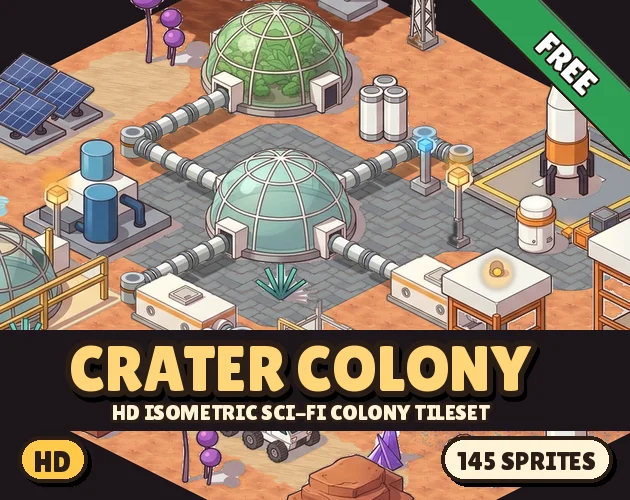
Crater Colony – free HD isometric tileset
Domes and modules with 3 build stages, corridor tubes that join themselves, running drills, autotile alien ground, icons and FX.
| Genre | Sci-fi colony |
|---|---|
| FREE pack | 148 sprites |
| LITE pack | $7.99 · 328 sprites + 22 VFX |
| Tile size | 128×64 and 256×128 (2:1 isometric) |
| Version | 1.1 |
| License | Commercial use allowed, no credit required; no resale of the assets |
| Art | AI-assisted art, finished by hand (see license) |
What's in Crater Colony
A sci-fi colony on a warm red planet for city-builder, base-builder and colony-sim games, in clean HD cartoon style on an exact 2:1 isometric grid. Every piece shares one grid, one light direction (sun from the top-left) and one anchor rule, so everything snaps together. The FREE pack alone builds a complete small colony level (see demo/).
What makes it different:
- Corridor tubes that join themselves: 16 tube pieces run through tile centres and plug into dome and module doors.
- Build stages: every dome and module comes as frame + scaffolding, half-built and finished.
- Running / off machines: the crystal drill has an animated running state (beacon + dust) and an off state.
- Autotile alien ground: regolith with corner transitions to sand, metal deck, ice, red dust and crystal fields.
What's inside
| Folder | Contents |
|---|---|
buildings/ | Habitat dome 3×3: dome_stage1..3, greenhouse (same shell, use dome_stage1/2 while it is built). Modules: module_x_stage1..3 (2×1, long along grid x), module_y_stage1..3 (1×2, long along grid y) |
tubes/ | Corridor tube autotile: tube_<arms> for every combination of the arms ne se sw nw + tube_hub |
machines/ | drill_on, drill_off, drill_run_strip (6 frames), ice pump 2×2, solar array 2×1, battery, landing pad 3×3, lander, ore silo, gas tanks, comms dish |
props/ | Cargo crates, container 2×1, iron ore pile, crystal ore pile, ice chunks, supply pod, lamp post, antenna mast, rover 2×1, beacon, survey flag, teal crystals, violet crystals, rock, mesa 2×2, bulb plant, frond plant |
tiles/ | 6 ground tiles (regolith, dust, sand, deck, ice, crystal) + 70 corner transitions at_regolith_<over>_<corners> + ground_sheet.png per size |
icons/ | 12 resource icons: iron ore, teal crystal, violet crystal, water, oxygen, energy, food, alloy, chip, fuel, rare metal, research data |
fx/ | dust_puff (one shot), beacon_glow (white, tint it), thruster (lander flame) + 3 demo VFX: shield_bubble, power_arc, landing_dust. A strip per FX + single frames (+ glow strips) |
tiled/ | Tiled tilesets (ground_*.tsx with a terrain set, objects_*.tsx) and a sample map sample_colony_*.tmx for each size |
demo/ | Phaser 3 demo of the sample colony: place tubes, step buildings through their build stages, switch drills, launch the lander |
Sizes: sprites, tiles and FX come as @128 (tile 128×64) and @256 (tile 256×128). Icons come as @64 and @128. All PNGs have true transparency; the soft contact shadows are in the alpha. contents.json lists everything and the sprite count.
Grid and anchors
- Grid: a tile is a 2:1 diamond, TW×TH = 128×64 (or 256×128). Grid +x runs down-right on screen, +y down-left. The screen position of grid point (gx, gy) is
x = (gx − gy)·TW/2,y = (gx + gy)·TH/2. - Tiles: put the image's top-left at
(x − TW/2, y)of the cell's north corner (bottom-centre on the south corner, as Tiled does). - Objects (
buildings,tubes,machines,props): each<folder>.jsongivesanchor, the pixel of the footprint's south corner. Put that pixel on grid point(gx + w, gy + h), wherefootprint= [w, h]. Every image is padded so the anchor sits at the horizontal centre, a fixed distance above the bottom edge (contents.json→pad_below_anchor), so one origin per size works in most engines. - Build stages of a building share footprint and anchor: swap them in place.
- Depth: draw objects in order of
gx + gy + (w + h)/2. Draw the landing pad with the ground (it is a decal), then the lander on it.
Corridor tubes
- A tube sits in the middle of its tile. Its arms reach the tile-edge midpoints:
ne= toward grid y−1,se= x+1,sw= y+1,nw= x−1. - For each tube cell, an arm is present when that neighbour is a tube, or when the cell is a door of a building: finished domes, the greenhouse and finished modules list their doors in
tube_portsas[dx, dy, arm](cell relative to the building's own cell, and the arm the tube there needs). - Name =
tube_+ the present arms inne, se, sw, nworder, ortube_hubfor a lone junction. Straights (tube_nesw,tube_senw) have no collar, so long corridors read as one tube.
Autotile ground (Wang corners)
- Terrain is stored per grid point. A cell takes its tile from its corners
n= (x, y),e= (x+1, y),s= (x+1, y+1),w= (x, y+1). - All 4 the same → the pure tile. Regolith + one other terrain →
at_regolith_<over>_<corners that are over>.png. - Keep a row of regolith between two other terrains. In Tiled use the terrain set in
ground_*.tsxwith the terrain brush.
FX points
lamp,antenna,beaconhavefx_points.beacon_glow: pixel offset from the anchor where the light is. Drawbeacon_glowthere, tinted (amber#ffb040, red#ff5040, blue#60c8ff) and additive.landerhasfx_points.thruster: the nozzle. Drawthrusterwith its top-centre there when it takes off.
VFX
Every VFX entry in fx/fx.json has set: "vfx", frames, fps, loop (false = one-shot), anchor (the frame pixel that goes on the effect point), blend (add = draw with additive blending) and use (where it goes). Glowing effects also have glow: a second strip with the same frames and anchor, always drawn additive. Directional effects (laser_bolt, plasma_muzzle, dust_gust) point to +x: rotate or flip them. Ground effects (shield_bubble, beacon_pulse, scan_sweep, landing_dust, hologram) are drawn on the 2:1 ground plane: put the anchor on the footprint centre. The demo has a VFX gallery (button VFX) and plays an effect where you click.
License and AI note
Free for personal and commercial games (see LICENSE.txt); credit appreciated, not required. Do not resell the assets as an asset pack. The painted art was made with AI image tools (Google Gemini) over our own grey-box guides; the grid, cut-outs, anchors, tube autotile, ground transitions, FX, metadata and demo are our own work.
More, including the LITE edition (more buildings, an ice-moon biome, 22 VFX, Godot 4 project): see the itch.io page.
From the pack's README.md. Folder names refer to the files inside the download.
License
Read the full license
dotPLAYS Asset License
Copyright (c) 2026 dotPLAYS (https://dotplays.com)

When you buy or download this pack you may:
- Use the assets in any number of your own games, apps, videos, prototypes and other projects, free or commercial.
- Modify, recolour, crop, scale and combine the assets with other assets.
- Use the assets in projects you build for a client.
- Credit is welcome but not required.

You may not:
- Resell, share or give away the assets themselves, on their own or in another asset pack, template or collection,
  even if they are modified.
- Upload the assets as stock content or as NFTs.
- Use the assets as training data for machine-learning models.
- Use the assets, or modified versions of them, as a logo or trademark.

The assets are provided "as is", without warranty of any kind.

AI disclosure: this art was made with the help of generative AI tools and then cut, cleaned, rigged and animated by hand
and in code by dotPLAYS.