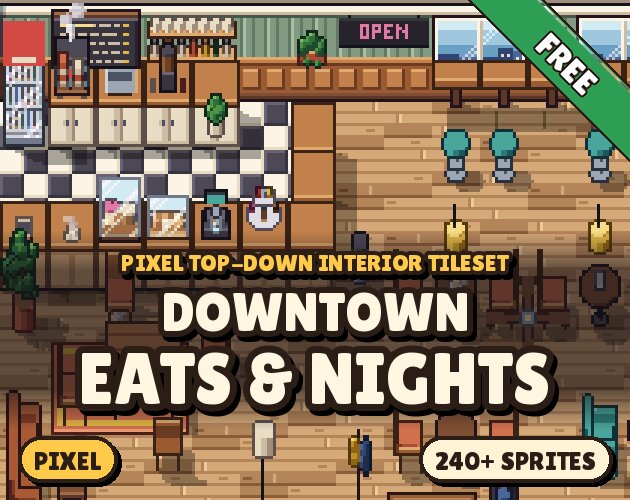
Downtown Eats & Nights – free pixel art tileset
A café with a kitchen and a restroom: 61 object types in 4 facings, 47-tile autotile walls, animated doors, stove and neon, and a room builder in the demo.
| Genre | Café interior |
|---|---|
| FREE pack | 240+ sprites |
| LITE pack | $7.99 · 811 sprites |
| Tile size | 16×16 (also 32×32 and 48×48) |
| Version | 1.0 |
| License | Commercial use allowed, no credit required; no resale of the assets |
| Art | No generative AI used |
What's in Downtown Eats & Nights
A cozy café you can build and play from this FREE pack alone: dining room, counter, small kitchen, restroom. Pixel art, 16x16 grid, top-down 3/4 view (the RPG Maker / Zelda-like view). Also exported at 32x32 and 48x48.
Every object that can turn comes in 4 facings (S, E, N, W), and you can sit on every seat in its facing. Every pixel is drawn by our own code (small 3D voxel models rendered to pixel art on a fixed palette). No generative AI was used.
Tested: opened in Tiled 1.12.2 and Godot 4.7.2 (all tilesets and maps load, wall terrain paints with 0 errors in both, the Godot demo scene builds and renders the whole café). RPG Maker MZ is not installed here: its wall autotiles were checked by rebuilding every tile from RPG Maker's quarter-tile rules (all exact), but please tell us if anything is off.
What's inside
- 61 object types = 118 object sprites (every facing): seating, tables, counters, café machines,
  kitchen, restroom, decor, wall items, ceiling lamps.
- 110 tiles: 6 floors x 4 variants, wall caps with full 47-tile autotile, wall faces in 3 styles (café wallpaper,
  brick, white tile) with end pieces, doors and windows for side walls, double entrance door, floor thresholds.
- 14 animations (59 frames): kitchen + restroom doors, "OPEN" neon sign, steam, ceiling fan,
  stove on (4 facings), running sink (4 facings), window.
- 95 floor shadows (separate sheet, so you can turn them off) and 25 "seat front" overlays.
- 2 example maps: maps/cafe.json and maps/cafe_full.json (café + kitchen + restroom).
- demo/index.html: open it in a browser (no install). Walk, sit, open doors, turn on the stove, and a room builder.
Folders
  sprites/      objects.png (atlas), shadows.png, seat_fronts.png  (+ @2x, @3x)
  singles/16|32|48/   one PNG per object and facing, named <type>_<facing>.png, e.g. chair_E.png
  tiles/        floors, wallcap (47 + 1), wallface, openings, door_S, thresholds  (+ @2x, @3x)
  anim/         animation strips, frames left to right  (+ @2x, @3x)
  catalog.json  everything about every sprite (see CATALOG below)
  maps/         example maps (format below)
  tiled/        Tiled tilesets + cafe.tmx + cafe_full.tmx
  godot/        Godot 4 TileSet + loader script + demo scene
  rpgmaker/     RPG Maker MZ tilesets (48 px) and event sheets, with its own README.txt
  palette/      palette.png / .json / .gpl
  demo/         browser demo + room builder
All sheets are on an exact 16 px grid (32 / 48 for the scaled copies): auto-slicing works.
CATALOG (catalog.json) For each sprite id (e.g. "sofa2_E"):
  atlas [x, y], w, h        position and size in sprites/objects.png (1x)
  foot [w, d]               footprint in tiles; the sprite's bottom foot_d*16 px are the footprint
  elev                      px above the floor (cups on tables = 12, machines on counters = 16)
  solid [x, y, w, h]        collision box in px, relative to the footprint's top-left (null = walk through)
  seats [{x, y, dir}]       where a character sits and which way it faces
  shadow [x, y], shadow_size   floor shadow in sprites/shadows.png, placed at the footprint's top-left
  front [x, y]              seat-front overlay in sprites/seat_fronts.png: draw it over a sitting character
  group / layer / wall      seating, tables, counters, appliances, kitchen, restroom, decor, wall (on north walls), ceiling
How to place a sprite: x = tile_x*16, y = (tile_y + foot_d)*16 - h - elev. Sort by the footprint's bottom edge. Ceiling items (lamps, fan) are drawn last.
MAP FORMAT (maps/*.json)
  cells: one string per row. '#' wall cap, 'F' wall face (upper row under a cap, then lower row),
         'D' / 'd' door in a side wall (leaf opens east / west), 'V' window in a side wall, 'S' entrance (2 cells).
         Other characters = floor, see "floor" (e.g. "c": "checker").
  face_style / face_styles: wall style for each range of columns.
  face_items: [anim id, x] on north wall faces (windows, doors, neon).  ceiling_items: [anim id, x, y].
  objects: [sprite id, x, y] with x, y = footprint top-left in tiles.
  interactive: sprite id -> animation to show when it is switched on.
TILED (1.10 or newer)
- Open tiled/cafe_full.tmx. Layers: floor, walls, wall items, objects (y-sorted), props on counters and tables, ceiling.
- Walls: wallcap.tsx has a "Wall" terrain set (47 tiles, mixed). Paint with the Terrain brush.
  A lone 1-tile wall piece has no terrain corners, so stamp it by hand. "Fill full tiles" mode and terrain bucket fill
  grow the shape by 1 tile on each side: that is how Tiled works.
- Objects: objects.tsx (one image per sprite, with collision and properties). Place them as tile objects.
Godot 4
- Copy the whole pack folder anywhere under res:// (for example res://vendor/downtown_eats/). Paths are relative.
- Pixel art: Project Settings > Rendering > Textures > Canvas Textures > Default Texture Filter = Nearest.
- Open godot/cafe_demo.tscn and press F6: it builds maps/cafe_full.json with godot/cafe_loader.gd.
- godot/cafe_tileset.tres sources: 0 floors, 1 wall caps (terrain set 0 "Wall", Match Corners and Sides), 2 wall faces,
  3 side doors/windows, 4 entrance, 5 thresholds.
- cafe_loader.gd: place("chair_E", Vector2i(x, y)) adds a y-sorted Sprite2D with collision; build_map(path) builds a whole map.
Rpg maker mz
- Copy rpgmaker/img/ into your project's img/ folder. Slots and passability: rpgmaker/README.txt.
Unity / gamemaker / others
- Use singles/ or sprites/objects.png with the rectangles from catalog.json.
- Unity: Pixels Per Unit 16, Filter Mode Point, Compression None. Pivot = bottom-left (0, 0) so the transform sits on the
  footprint's bottom-left corner. Transparency Sort Axis (0, 1, 0) for y-sorting.
LICENSE (short version, full text in LICENSE.txt) Free and commercial games and apps, modified or not. Credit appreciated, not required. Do not resell or redistribute the assets themselves. AI coding assistants may read these files to place the assets in your game; do not use the assets to train image-generating AI.
More rooms (fast food, restaurant, bar, arcade), color variants and more maps: the LITE version on the same itch page.
From the pack's README.txt. Folder names refer to the files inside the download.
License
Read the full license
Downtown Eats & Nights – license (FREE)

You may use these assets in free and commercial games and apps, modified or not.
Credit appreciated, not required (e.g. "Interiors: Downtown Eats & Nights by dotplays").
You may not resell or redistribute the assets themselves (alone, modified, or inside another asset pack),
or claim them as your own.
You may let AI coding assistants read these files to place the assets in your game.
You may not use the assets to train or fine-tune AI models that generate images.

How it was made: every sprite, tile and animation in this pack is drawn by our own code (voxel models rendered
to pixel art on a fixed palette). No generative AI was used for the art, the cover or the screenshots.
The JSON, the Tiled / Godot / RPG Maker files and the demo are our own work too.